Thursday, December 19, 2019

Hud

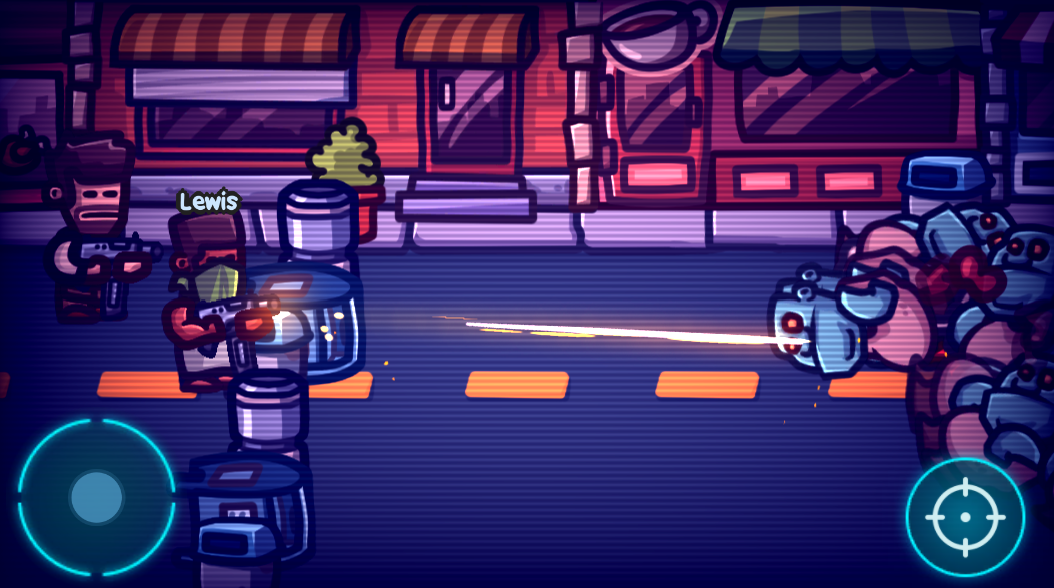
While creating this hud that depicts life and ammunition of the player, I had to settle on decisions pertaining to the underlying design of the game.

First non-functional placeholder concept (this is just a single sprite)

Using my go-to style, but this did not match the visual style of the joystick buttons

Using pieces of licensed interface art to create the look

Fully functional, and matches the rest of the interface

Ammunition


There will be unlimited total ammunition for each gun. However, each gradually refills at a constant rate over time without the need of a reload animation. When depleted, the player can still fire rockets or bullets, but at a very slow rate as ammo is restocked automatically.

I made this decision to encourage usage of secondary weapons when ammunition of the primary weapon is depleted. If weapons instead were reloaded to maximum capacity using an animation induced by a button (or automatic when ammo is fully depleted), then it would lead to some annoying situations:
  • Being forced to run away while reloading.
  • Never being able to reload successfully because of the overwhelming number of enemies.
  • Never needing the use of secondary weapons.
These small decisions may seem trivial, but it makes an enormous impact on future design decisions and the overall feel of the game.

Life


I have adjusted the life of the player to be integers depicted by whole-hearts rather than some adjustable percentage meter. Unlike similar interfaces featured in games like Legend of Zelda, I wanted absolutely any hit to deduct a full heart, rather than half or full on a conditional basis. To adjust difficultly, I would simply increase the chances of the player getting hit, rather than adjusting damage to deduct half or full which could lead to confusion and sense of unfairness.

Therefore, I do not have to adjust damage amounts through tables and function curves which can turn into a huge nightmare.

Keeping both features simple for now...

Saturday, December 14, 2019

Wall defense mode

This sequel would not be complete without a wall based defense mode. At least in Unity this is rather easy by just setting up a wall consisting of multiple game objects with stationary rigid bodies and circle colliders.

Wall with collider, rigid body, sprite, and depth components

The depth values of these pieces when live are automatic through a component that sets the z component of the local position.


This worked much better than expected. I just force the humans to always face right, only create enemies on the right side, and just let physics and basic AI do everything else.

I also added some other minor features, like reward boxes with randomized contents.


Moving right along....

If this first area of the game with these several characters for missions and weapons work out, then extending this experience through other areas and content will be rather straight forward.

I figure each area will have unique missions, but each will have common ones like exploration and wall-based defense with randomized rewards.

Friday, December 6, 2019

Characters

A bunch more characters ready to be exported into separate parts for animation. There are three arms for each character, swapped depending on the weapon or item being held.


Some of these are from my previous games, improved and redone at a higher resolution.

Scaling is a bit of an issue. It is still better to make the parts slightly bigger because it can be scaled down, despite reducing relative thickness of the lines.

Top: new characters. Bottom: Zombie Guard (2015)

I like to use really thick bold lines. Shadows tend to shift towards blue, and highlights tend to shift towards red and yellow. I never use pure black. Shapes tend to be curved and obtuse. When in doubt, I make something larger or thicker than necessary. Small details get omitted.

Back to programming... and the perils of design


These are enough for now. I can go back to programming with the content I have. At this rate I could at least distribute a demo within a month, to showcase the first 15 minutes of the game.

Thursday, November 28, 2019

Missions

I got a few more characters and basic interaction with non-player characters (NPCs). There is some dialog and missions that can be activated through a scripted sequence of events. I want this to break up the monotony of otherwise just slaying zombies while unlocking equipment. Here are some ideas featured in some missions:

  • Restriction to just one specific weapon
  • Run nonstop, shooting and avoiding obstacles
  • Defend behind a wall (Zombie Guard)
  • Escort an NPC targeted by all zombies
  • Recover item(s)
  • Survive over time
  • Passively only heal NPCs

Comparably, Zombie Guard has no story and the dialog is semi-random. It has unique survival modes, but otherwise is just wall-based defense. This limitation was not necessarily a bad design choice.

Quick creation of an additional character (also seen in-game below)
The body parts replace the existing skeleton animation, so no additional animation is necessary.

NPC interaction

Taking advantage of Unity's powerful Canvas rendering system for arranging UI.
A reference to a classic film.

An active mission

The text will be in English, and voice sound effects are just mumbles and gibberish so I can localize into other languages later.

The controls (bottom right of screenshots above) ordinarily used for weapons dynamically changes to NPC interaction options. Keeping it simple.

Speaking of simple, I spent the evening learning more of Unity's Canvas rendering system to avoid having to implement my own custom interface components.

Canvas related components for rendering multiple lines of text 

Just the Text component alone is insufficient for multiple lines of text that automatically scale and constrain within a desired width. An additional panel with components like ContentSizeFitter was necessary. None of this was obvious, but now it makes sense and I can see myself utilizing more of these built-in components.

Wednesday, November 20, 2019

Melee

It seemed necessary to include melee weapons. The collision is checked with a line segment during a key frame of the animations. At first it was not working correctly at all times, so I used Debug.DrawLine which showed me I was not properly setting a transform to the correct parent object.


I'm putting effort into better animations, and properly using a multiplier in code for the animation speeds so feet do not appear to skate across the ground. The Spine tool for animation is really practical and allows multiple animations to be blended together automatically, like walking, swinging, and pain reactions, all simultaneously.

Spine Animation Tool

Also the shader has been modified, so I can apply additive and modulated tints. As soon as I did this, it became clear that some bullet projectiles were hitting multiple targets if collided in the same frame, so this has been fixed by adding a flag that permits only one target.

Sunday, November 17, 2019

Half dozen weapons

I got four weapons to show, plus more just about finished. Some extra effort was necessary for the green ooze gun which creates debris and a puddle. These components can be reused just by changing the sprites.

Oozer

Mini Blaster

Ricochet Cannon

Shotgun

The projectile system will automatically use ray-casting for continuous collision, if it is moving faster than a certain speed. There is absolutely no gun or projectile specific code in the small projectile system, because everything is data-driven through code. There are all kinds of ways of doing this, but this works best for me in the long run.

Projectile data for the Ricochet Cannon above.
Member variables are not readonly because I do change these values live.

This style is kinda something I derived from Quake games written in C, my first exposure to game code. The style just kinda stuck with me. I could instead just use more prefabs and the Unity editor interface, but I prefer code to easily search and manipulate many at once if necessary.

Thursday, November 14, 2019

Xcode

Gem Heroes has successfully been built for iOS and sent off to be reviewed by Apple. There were many technical problems, as expected. In my experience distributing an app for the Apple App Store is about 20 times harder than distributing for Google Play.

Unity does not actually build the iOS app. It instead just creates an Xcode project to continue to build on a Mac. I rent one in the cloud, conveniently through a browser. It actually is pretty remarkable; I get to use the latest versions of Mac operating system without owning a Mac or upgrading the operating system.

The build settings are extraordinarily sensitive, and the errors tend to be vague and seemingly unrelated to the actual solutions.

Fail.

Fail.
The first time I added an incompatible framework which turned out to be unnecessary anyways. The second time I thought I had to change permission settings with a chmod command on a framework, but the solution was to change it from embedded to dynamically linked.

Then there were the usual certificate and provisioning problems. Apple has improved this by providing the option to automate it, but I still had to change a certificate manually when I submitted the build. Strange.

This is some really esoteric stuff. It took a lot of Googling and trial-and-error.

But I got it finished, and now I can resume progress on the new zombie game which I find to be much more interesting.